Archive

Archive for the ‘网络编程’ Category

Systemtap辅助设置tcp_init_cwnd,免对操作系统打Patch

March 21st, 2011 5 comments

原创文章,转载请注明: 转载自Erlang非业余研究

本文链接地址: Systemtap辅助设置tcp_init_cwnd,免对操作系统打Patch

前段时间google的工程师提出对tcp的拥塞窗口的初始值进行增大可以显著的提高http的性能,这个主要是针对tcp的slow start的优化.
具体参考这里, 这里. 谢谢叔度同学从美国带回第一手信息!

由于低版本的linux内核的问题,这个参数的正确设置需要对os打patch,这个过程对线上机器来讲非常麻烦。 底下我用systemtap给出了个解决方案,免除这个麻烦. 我们在RHEL 5U4上作这个试验:
Read more…

Post Footer automatically generated by wp-posturl plugin for wordpress.

来自RHEL系统调优手册的几张经典图

July 20th, 2010 2 comments

原创文章,转载请注明: 转载自Erlang非业余研究

本文链接地址: 来自RHEL系统调优手册的几张经典图

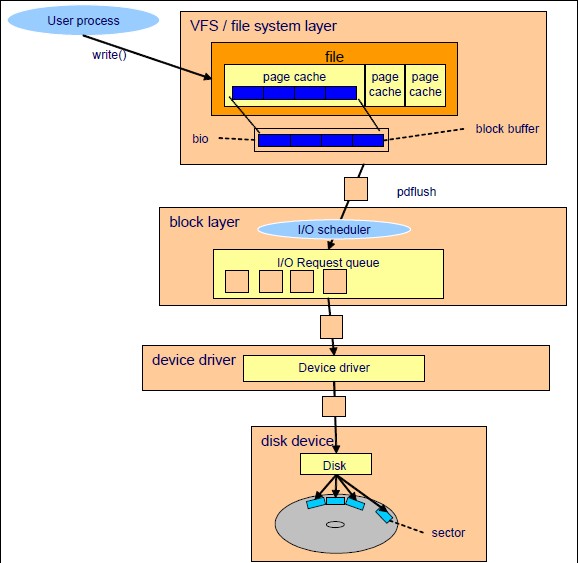
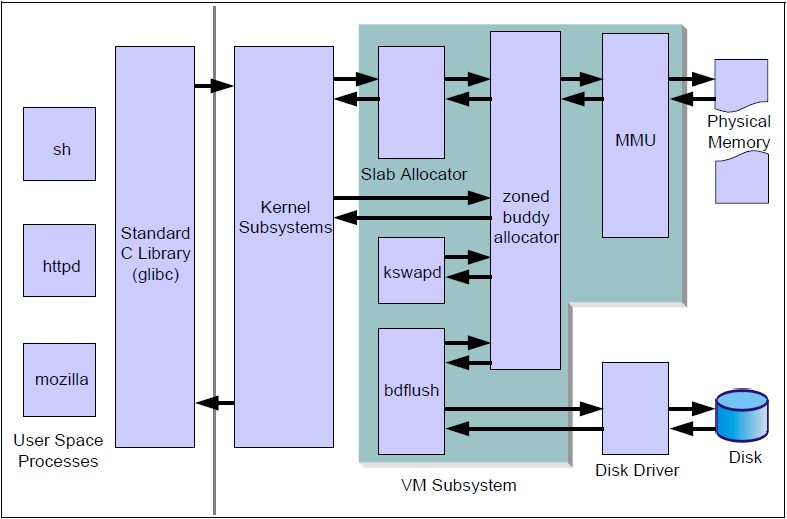
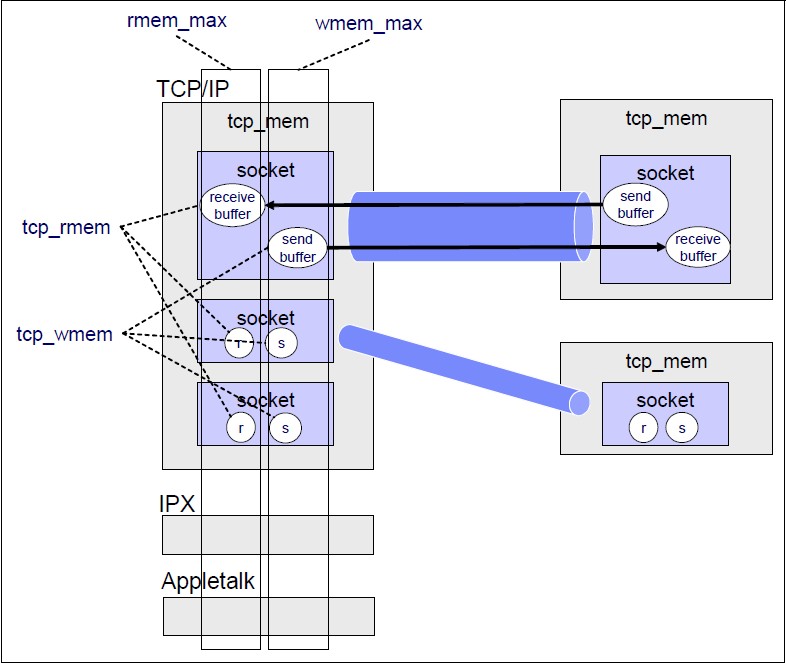
调优手册在这里下载: http://www.redbooks.ibm.com/redpapers/pdfs/redp4285.pdf
看图不说话:)

IO架构图:

内存管理图:

很容易误解的socket buffer:

Post Footer automatically generated by wp-posturl plugin for wordpress.

Categories: 杂七杂八, 网络编程 Tags:

非阻塞connect的一个细节

May 18th, 2010 4 comments

原创文章,转载请注明: 转载自Erlang非业余研究

本文链接地址: 非阻塞connect的一个细节

昨天听zhuzhaoyuan说的一个connect细节. 通常我们connect的时候都是非阻塞的, 在connect调用后把句柄挂到poll去, 等poll通知可写的时候, 我们就认为connect成功了. 但是在linux平台下实际上不一定成功, 具体的要用socket get_opt来检查下出错码来决定.

以下是从man 2 connnect摘抄的:

EINPROGRESS
The socket(2,7,n) is non-blocking and the connection cannot be com-
pleted immediately. It is possible to select(2,7,2 select_tut)(2) or poll(2) for
completion by selecting the socket(2,7,n) for writing. After select(2,7,2 select_tut)
indicates writability, use getsockopt(2) to read(2,n,1 builtins) the SO_ERROR
option at level SOL_SOCKET to determine whether connect com-
pleted successfully (SO_ERROR is zero) or unsuccessfully
(SO_ERROR is one of the usual error(8,n) codes listed here, explain-
ing the reason for the failure).

我们看下erlang的inet_drv是如何处理的.
./erts/emulator/drivers/common/inet_drv.c:

        {
            int error = 0;      /* Has to be initiated, we check it */
            unsigned int sz = sizeof(error); /* even if we get -1 */
            int code = sock_getopt(desc->inet.s, SOL_SOCKET, SO_ERROR,
                                   (void *)&error, &sz);

            if ((code < 0) || error) {
                desc->inet.state = TCP_STATE_BOUND;  /* restore state */
                ret = async_error(INETP(desc), error);
                goto done;
            }
        }

结论: 细节决定品质.

Post Footer automatically generated by wp-posturl plugin for wordpress.

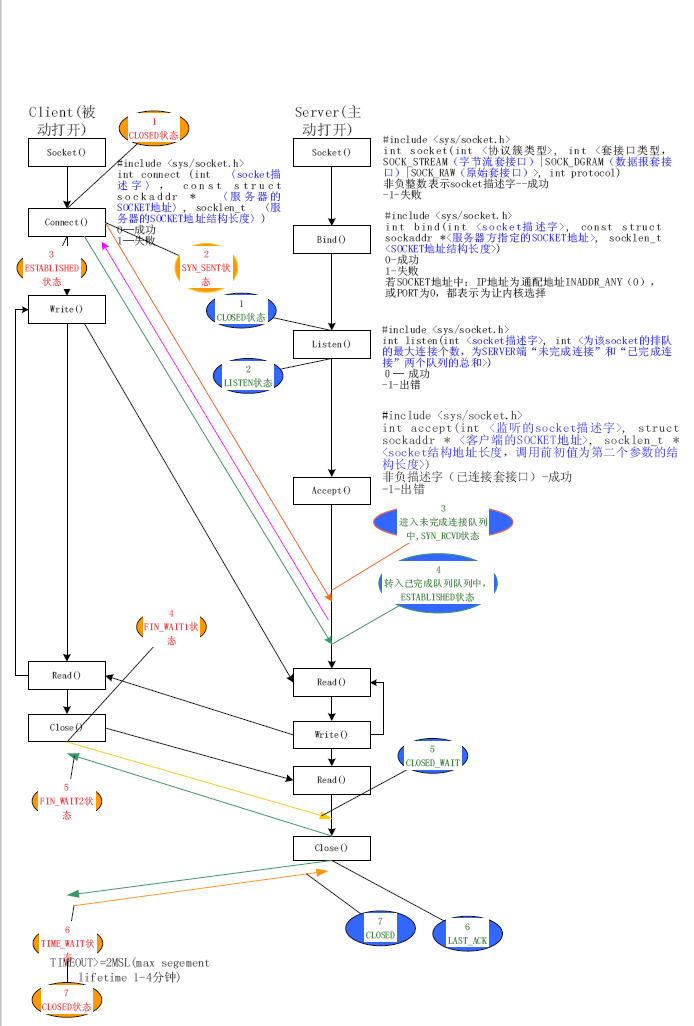
看图学TCP API以及状态变迁

January 28th, 2010 No comments

原创文章,转载请注明: 转载自Erlang非业余研究

本文链接地址: 看图学TCP API以及状态变迁

Post Footer automatically generated by wp-posturl plugin for wordpress.

Categories: 网络编程 Tags: , , ,

用systemtap来修改下linux内核变量的值

October 29th, 2009 1 comment

原创文章,转载请注明: 转载自Erlang非业余研究

本文链接地址: 用systemtap来修改下linux内核变量的值

我们在探索linux内核的时候,经常需要调整下变量的值,看它对系统的影响。如果这个值没有透过/proc来修改的话,那只能编译内核。这个步骤是非常繁琐的。现在我们有systemtap这个利器来帮忙了。

演示如下:
我们通过修改过
extern int sysctl_tcp_fin_timeout;的值来达到目的。是因为这个值是proc导出的 我们好验证是否成功。

root@localhost ~]# cat /proc/sys/net/ipv4/tcp_fin_timeout
15000
[root@localhost ~]# cat test.stp
probe begin
{
        printf("ready go\n");
}

probe kernel.function("do_tcp_setsockopt")
{
        $sysctl_tcp_fin_timeout = $1
        printf("sysctl_tcp_fin_timeout = %d\n", $sysctl_tcp_fin_timeout);
        exit()
}

[root@localhost ~]# stap -g test.stp 18000
ready go

这个时候 stap在运行, 只是还没有触发do_tcp_setsockopt.
现在我们来触发

[root@localhost ~]# erl
Erlang R13B02 (erts-5.7.3) 1 [64-bit] [smp:2:2] [rq:2] [async-threads:0] [hipe] [kernel-poll:false]

Eshell V5.7.3  (abort with ^G)
1> {ok, LSock} = gen_tcp:listen(0, []).
{ok,#Port<0.437>}
2>
2> inet:setopts(LSock, [{nodelay,true}]).
ok
3>

Ok,这时候回头可以看到stap打出来以下:
sysctl_tcp_fin_timeout = 18000

我们来验证下:

root@localhost ~]# cat /proc/sys/net/ipv4/tcp_fin_timeout
18000

OK,成功。

Tips:
1. stap对全局变量的写需要-g guru模式。
2. 全局变量必须在一个单元内的函数里面才可以修改, 而且必须是在内核上下文。

PS. 这样写的话会更好,因为这个变量是单元可见的,这个模块里面的任何函数被触发都可以看到这个变量. 因为这是tcp的核心模块随时都会被出发的,免除了以上的麻烦!

$ cat test.stp
probe begin
{
        printf("ready go\n");
}
probe kernel.function("*@net/ipv4/tcp.c")
//probe kernel.function("do_tcp_setsockopt")
{
        $sysctl_tcp_fin_timeout = $1
        printf("sysctl_tcp_fin_timeout = %d\n", $sysctl_tcp_fin_timeout);
        exit()
}

Post Footer automatically generated by wp-posturl plugin for wordpress.

JVM 64位pointer compress, Erlang呢?

October 10th, 2009 No comments

原创文章,转载请注明: 转载自Erlang非业余研究

本文链接地址: JVM 64位pointer compress, Erlang呢?

前端时间看到JVM的 64 pointer compress技术,蛮多感慨的。具体的可以 google
64位 pointer compress 来了解更多。

好不容易从32位系统中逃脱,解决了4G内存的问题,而且64位的cpu更多的寄存器,可以带来更好的性能。但是怎么又碰到问题了。64位的系统,64位的指针,意味着更多的数据访问, cpu速度是提高了,但是内存的带宽和访问速度没有大的提高。而且内存的访问速度和cpu的cycle差几个数量级别,所以对于普通的网络程序来讲,大部分是处理信息的变形,也就是说是把内存里面的数据从一个形式变成另外一个形式。 cpu性能的提高对这种程序来讲 影响不是很大。倒是因为数据的量加大了1倍, 导致整体的性能降低了百分几十。实际的硬件系统也没有那么多内存,一般都是16G以下,所以才有人去想在64位系统下,用36位的指针,减少内存的访问。

erlang的系统基本上是个网络程序,所以这个问题就非常突出。 目前没看到otp vm的这方面的打算, 我还是乖乖的用我的32位系统

Post Footer automatically generated by wp-posturl plugin for wordpress.

Categories: 网络编程 Tags: ,

erlang的profile工具原理和优缺点

October 6th, 2009 No comments

原创文章,转载请注明: 转载自Erlang非业余研究

本文链接地址: erlang的profile工具原理和优缺点

erlang的tools application下包含了一系列的profile工具, 包括 eprof cprof fprof, 具体的使用可以参看文档和<< erlang effective guide>>.

我这里要说的是他们的工作原理。 这些模块的核心都是根据erlang的trace机制实现的。在模块执行的时候,trace机制会通知那个函数被调用 返回。根据这些信息就可以统计出来函数调用的频度,调用栈等。

但是利用这个机制会有严重的性能损失。因为每个函数调用都要发送一条trace信息,每个trace 信息会引起上下文切换 而且要耗费2-3的时间。这个对大型的系统是不可接受的。

所以知道这些原理以后, 我们在profile大型的系统的时候,我们可以在dbg模块的帮助下, 只收集我们感兴趣的东西,而且严格限定范围,避免对系统造成大的干扰,这样收集出来的东西才有意义。

Post Footer automatically generated by wp-posturl plugin for wordpress.

Categories: 网络编程 Tags: